Event Collector Workflow
The following is a block diagram of the event collector lifecycle:
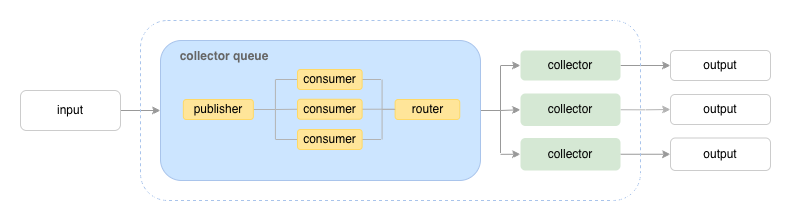
Input is any source of event data – this could be an an upstream application, an API endpoint, an MQTT broker delivering subscribed messages, etc.
Output is any endpoint, service, or a persistent storage – anything you want to send you event payloads to downsteam
The event collector stage consist of:
a collector queue running consumers that listen for event payloads from the input;
a router that sends event payloads from consumers to collectors depending on the delivery mode;
one or more collector objects that process the event payloads and sends them to the output.
The event-collector library provides a publisher-consumer queue
and a set of data structures to build the middleware layer between
your input source and your output services.
Event Collector Setup Overview
Below is a walkthrough of the various event collector components explaining how the library supports different use cases. We’ll start from the “output” end and work our way backwards towards the “input.”
A. Defining Collectors
For each data processing workflow, you need to create a
Collector object. The
collector’s responsibility is to take input event payloads, process
them, and send them to the output. The Collector requires a
Processor function, and a unique
key to associate with the function so the collector queue can route
event payloads to their destination. You can create as many collectors
as your workflow requires. The collector queue will route input event
payloads to these collectors according to the delivery method you use
(more details on this below, see C. “Creating Payloads & Specifying
Delivery”).
A minimal processor function looks like:
from event_collector import Context, Ok, Payload, Result

async def event_handler(payload: Payload, ctx: Context) -> Result:
    """Process event payload and prepare result."""
    ...
    return Ok(result)
To create a Collector instance, supply the key and processor as parameters:
from event_collector import Collector

key = "demo-collector"
collector = Collector(key, event_handler)
The signature for a Processor,
which is the event handler, is:
type Processor = Callable[[Payload, Context], Awaitable[Result]]
A Payload is a wrapper for the event
payload value. It also carries metadata on how to deliver the payload
to collectors. We’ll go over payload details more below
(see C. “Creating Payloads & Specifying Delivery”).
A Context is a container to store
objects and values for the collector it’s attached to. Each
Collector automatically creates an empty Context object. You
can also create your own Context and pass it in the ctx
parameter when you initialize the Collector. For example:
key = "demo-collector"
ctx = Context()
ctx.config_value = os.getenv("CONFIG_VALUE")

collector = Collector(
    key,
    event_handler,
    lifecycle=lifecycle,
    ctx=ctx,
)
The Collector also accepts a topics parameter (a list of
str) that specifies the list of topics the collector listens
to. Like the collector “key,” topics are used for
routing. (See C. “Creating Payloads & Specifying Delivery” below).
If your collector requires initialization, such as when you are
writing to a database backend and need to store a “repository” object
for the collector to access, you can create a
LifecycleManager:
from contextlib import asynccontextmanager

from event_collector import Collector, Context, Payload, Result

from your_application import event_handler, SensorDataRepository

@asynccontextmanager
async def lifecycle(ctx: Context) -> None:
    """Perform setup and shutdown steps for collector."""
    try:
        ctx.repository = SensorDataRepository()
        ctx.repository.setup()
        yield
    finally:
        ctx.repository.shutdown()


 # Create Collector
 key = "demo-collector"
 topics = ["sensor-data", "temperature"]
 collector = Collector(key, event_handler, lifecycle=lifecycle, topics=topics)
B. Configuring the CollectorQueue
A minimal CollectorQueue only
requires:
adding a
collectorslist to parameters (note: collectors must be a list ofCollectorinstances);setting
min_consumersandmax_consumers.
The simplest way to run the collector queue is to use the
CollectorQueue instance as an async context manager:
from event_collector import Collector, CollectorQueue

from your_application import event_handler

collector = Collector(key, event_handler)
collectors = [collector]
min_consumers = 1
max_consumers = 1000

collector_queue = CollectorQueue(
    collectors,
    min_consumers=min_consumers,
    max_consumers=max_consumers,
)

async with collector_queue:
    publisher = collector_queue.get_publisher()
Once you’ve created the collector queue and it is running, use the
EventPublisher
send method to send
event payloads to the collector queue.
You can also run the collector queue by calling its initialization and shutdown methods manually:
try:
    collector = Collector(key, event_handler)
    collectors = [collector]
    min_consumers = 1
    max_consumers = 1000

    # Create and initialize collector queue
    collector_queue = Collector_Queue(
        collectors,
        min_consumers=min_consumers,
        max_consumers=max_consumers,
    )
    await collector_queue.init_queue()

    # Get the EventPublisher to send events
    publisher = collector_queue.get_publisher()
    ...

except Exception as e:
    # Handle any exceptions
    ...

finally:
    # Shut down collector queue
    await collector_queue.shut_down_queue()
C. Sending event payloads
When you have a collector queue running in the background, you can send any
input event payloads to the publisher-consumer queue using the EventPublisher
from the collector queue.
The collector queue is designed to run as part of a service – for example, a containerized application that listens to input, like an API service, or a subscriber to a message or event queue.
You can integrate the collector queue with your application service by using
the CollectorQueue as an async context manager:
from event_collector import CollectorQueue, Payload

def get_collector_queue() -> CollectorQueue:
    collector_queue = CollectorQueue(
        collectors,
        min_consumers=min_consumers,
        max_consumers=max_consumers,
    )
    return collector_queue

...

async def your_app_service() -> None:
    collector_queue = get_collector_queue()

    async with collector_queue:
        publisher = collector_queue.get_publisher()

        while True
            ...

            # use the publisher to send input event payloads to the
            # collector queue
            data = await get_input_event_payload()
            payload = Payload(data)
            publisher.send(payload)

            ...
D. Creating Payloads & Specifying Delivery
When using the EventPublisher to
send payloads, you must wrap the payload data in a
Payload object.
Payload is a container that wraps
the value you’re sending to the collector, plus additional metadata
that tells the collector queue how to deliver the event payload.
The Payload class defines the
following attributes:
class Payload[T]:
    value: T
    delivery: Delivery  # Delivery is an enum of values: BROADCAST, KEY, TOPIC
    keys: list[str]
    topics: list[str]
    priority: int  # if using a priority queue
You can store a value of any type in Payload.value. For our
documentation examples, we’re assuming the input event payloads are
events or messages that could be serialized and deserialized, so we’re
using a dict here for that general use case. delivery,
keys, and topics are metadata attributes used by the collector
queue’s router to deliver the event payload. The priority value
tells the collector queue to send the event payload with the specified
priority if you’re using a priority queue (the CollectorQueue must
be initialized to use an asyncio.PriorityQueue for this use case
– see queue_type).
Here is a simple payload using the default delivery mode (which is “broadcast” to all collectors):
from event_collector import Payload

...

publisher = collector_queue.get_publisher()

payload_data = {
    "data": "payload data",
}
payload = Payload(payload_data)

await publisher.send(payload)

...
To have more fine-grained control over how the payload is delivered, you can set the delivery mode as follows.
Setting the delivery mode
The event payload delivery supports 3 modes (see
Delivery), and you can specify
the delivery mode when sending the payload:
Delivery by direct keys: sending to collectors directly by specifying their identification keys – the collectors with the specified keys must already be initialized by the collector queue:
from event_collector import Delivery, Payload

...

publisher = collector_queue.get_publisher()

payload_data = {
  "data": "payload data",
}
delivery = Delivery.KEY
keys = ["custom-collector"]
payload = Payload(payload_data, delivery=delivery, keys=keys)
await publisher.send(payload)
Delivery by topics: sending to collectors by specifying a set of topics – the collectors must define the topics they are listening to:
from event_collector import Delivery, Payload

...

publisher = collector_queue.get_publisher()

payload_data = {
    "data": "payload data",
}
delivery = Delivery.TOPIC
topics = ["sensor-data"]
payload = Payload(payload_data, delivery=delivery, topics=topics)
await publisher.send(payload)
Delivery using broadcast mode: sending to all collectors – this is the fanout or broadcast pattern:
from event_collector import Delivery, Payload

...

publisher = collector_queue.get_publisher()

payload_data = {
    "data": "payload data",
}
delivery = Delivery.BROADCAST
payload = Payload(payload_data, delivery=delivery)
await publisher.send(payload)

# or simply

payload_data = {
    "data": "payload data",
}
payload = Payload(payload_data)
await publisher.send(payload)
Based on the payload metadata, the default collector queue router
(SimpleRouter) will send the event
payload according to the specified mode:
In direct key delivery mode (
Delivery.KEY), the router will dispatch the event payload to the collectors with those keys; if a key matches no collector, the router will return an emptyOkresult and the event payload will not be delivered.In topic delivery mode (
Delivery.TOPIC), the router will dispatch the event payload to the collectors that are listening to topics matching the event topic(s); if a topic matches no collector, the router will return an emptyOkresult and the event payload will not be delivered.In broadcast delivery mode (
Delivery.BROADCAST), the router will send the event payload to all collectors associated with the collector queue.
For most use cases, the default router
(SimpleRouter) should be
sufficient and you would not need any custom configuration for
this.
Note
The collector queue does not persist any event payloads. It’s the collector’s responsibility to persist event payloads if that is an application requirement. Therefore, if the application crashes, the event payloads inflight will also disappear.
E. Customizing CollectorQueue
The collector queue accepts various parameters to configure its behavior. The main parameters are:
collectorsmin_consumersmax_consumers
For simple cases setting values for the above is sufficient. The default setup assumes you are sending event payloads to one or more collectors and these all receive the same event payload.
The CollectorQueue supports the 3 types of asyncio.Queue (see
QueueType):
FIFOqueuePriority QueueLIFOqueue
To specify the queue type, set the
queue_type parameter
when creating the CollectorQueue:
from event_collector import CollectorQueue, QueueType


collector_queue = CollectorQueue(
    collectors=collectors,
    min_consumers=min_consumers,
    max_consumers=max_consumers,
    queue_type=QueueType.FIFO
)

# or

collector_queue = CollectorQueue(
    collectors=collectors,
    min_consumers=min_consumers,
    max_consumers=max_consumers,
    queue_type=QueueType.PRIORITY
)

# or

collector_queue = CollectorQueue(
    collectors=collectors,
    min_consumers=min_consumers,
    max_consumers=max_consumers,
    queue_type=QueueType.LIFO
)
When using a priority queue, you must set a priority when sending the
event payload using the EventPublisher.send method:
collector_queue = CollectorQueue(
    collectors=collectors,
    min_consumers=min_consumers,
    max_consumers=max_consumers,
    queue_type=QueueType.PRIORITY,
    default_priority=1000,
)
publisher = collector_queue.get_publisher()

priority = 0
payload = Payload({"data": "payload_data"}, priority=priority)
await publisher.send(payload)
Note
The collector queue does not guarantee strict event ordering at the collector processing end, because event payloads may be ingested concurrently and this may result in a different ordering than the queue being used (FIFO, Priority Queue, or LIFO) for delivery to the collectors.
F. Using a Custom Router
The CollectorQueue uses a default router
(SimpleRouter) that delivers event
payloads according to the Delivery
mode set in the Payload object. The
default router can handle use cases where you are delivering to:
a set of collectors directly (using
Delivery.KEY);a set of collectors listening to “topics” (using
Delivery.TOPIC);or, all collectors (using
Delivery.BROADCAST).
If the default router logic does not fit your use case, you can write
your own Router subclass and set
the router parameter
to the custom class when creating your CollectorQueue:
from event_collector import CollectorQueue, Payload, ResultList, Router


class CustomRouter(Router):

    async def handle_event(self, payload: Payload) -> ResultList:
        """"
        Custom routing logic here. Return value must be ResultList.
        """
        ...

 collector_queue = CollectorQueue(
     collectors=collectors,
     router=CustomRouter,
     min_consumers=min_consumers,
     max_consumers=max_consumers,
 )
G. Handling Return Values
When sending event payloads to the collector queue, the
EventPublisher
send() method will
return a CollectorEvent object. The
CollectorEvent will return one or more results depending on how the
event payload was delivered. If the backend collectors have not
completed processing the event payloads, the CollectorEvent will
return None.
Getting the result from a CollectorEvent
The collector event has a
get_result() method to
fetch the return value from the collector (or collectors) that
processed the event payload. If the result is not yet
available. The get_result method will return None.
The wait() method will
block until the result is available, then it will return the value
from get_result. The return value of both wait and
get_result is a ResultList.
from event_collector import Delivery, Payload

payload_data = {
    "data": "payload data",
}
delivery = Delivery.TOPIC
topics = ["sensor-data", "temperature-readings"]
payload = Payload(payload_data, delivery=delivery, topics=topics)

# The publisher.send method will return a CollectorEvent object when called
event = await publisher.send(payload)

# Fetch the ResultList
result_list = await event.wait()

# Or, use get_result if you know the event is already done
result_list = await event.get_result()
Getting the result from a ResultList
A ResultList is a wrapper for a
list of Result objects. The reason
for using a collection of return values is that the collector queue
may deliver an event payload to more than one collectors in the
backend. This can happen if the delivery mode is set to
Delivery.TOPIC or Delivery.BROADCAST – or even to multiple
collectors using Delivery.KEY. In these situations, the ResultList
will contain the Result objects returned by all the collectors
who processed an event payload.
Single Result
If the event payload was sent to only one collector, you can retrieve
the result using the first()
method, which returns the first item in the results list.
Example:
...

event = await publisher.send(payload)

# (1) Fetch the ResultList
result_list = await event.wait()

# (2) To get only one Result object, use the "first" method
result = result_list.first()

# (3) Check if result is Ok or Error
match result:
    case Error(_):
        # Handle exception
        ...
    case Ok(value):
        # value is the return value from the collector
        print(value)
Multiple Results
If the event payload was processed by more than one collector,
you can retrieve the results using the ResultList
iter() method, which
returns a generator that will yield each Result.
Example:
...

event = await publisher.send(payload)

# (1) Fetch the ResultList
result_list = await event.wait()

# (2) To get all Result object, use the "iter" method
async for result in result_list.iter():
    # (3) Check each result to see if it is Ok or Error
    match result:
        case Error(_):
            # Handle exception
            ...
        case Ok(value):
            # value is the return value from the collector
            print(value)
Fire-and-forget mode
If your event processing flow is “fire-and-forget,” then you can
ignore the return value of the EventPublisher.send method.
Example:
...

await publisher.send(payload)
Note
Direct key, topics, and broadcast delivery will not return an error
if event payloads are not delivered to collectors. They return an
empty Ok result. If acknowledgement is required after sending
the event payload, use the Result return value as an indicator
of successful delivery.
The collector queue guarantees “exactly once” delivery because it is using the internal asyncio.Queue in the same process as the application code.
H. Error handling
When running code as part of an asyncio.Task, return values and exceptions do not always “bubble up” to the caller in a clean and simple way, especially if an event payload is sent to multiple collectors.
In the collector queue, a collector always returns a Result
object that indicates if the processing is Ok or an
Error. It’s up to your event handler to decide on what Ok and
Error results mean.
In general, Error should capture an exception that signifies a
failure that prevented the event processing from reaching a
“completed” state. In this scenario, a fault in the data being
processed could be considered an Ok result but with a value
indicating the fault. In this case, your application will need to
create a data structure that allows your event handler to return
information about the fault that has occurred. This may be an event
that can be re-processed or retried, or it can be dropped, etc. How
this is handled is dependent on the application use case.